DNS Lookup Failed? What NXDOMAIN, SERVFAIL and EAI_AGAIN Mean
Short answer: "DNS lookup failed" means your device asked a DNS resolver to turn a hostname into an IP address and did not get a usable answer. The wording changes from tool to tool (Could not resolve host in curl, ENOTFOUND in Node.js, Temporary failure in name resolution on Linux), but the cause is almost always one of four things: the name does not exist, the name exists but has no record of the type you asked for, the resolver could not get a valid answer, or your machine cannot reach a resolver at all. The fastest way to tell which one you have is to run one dig command and read the status line.
This guide is a decoder for the messages developers and admins actually see. If your problem is the browser page that says "DNS server isn't responding", read our DNS server not responding guide; for the Chrome-specific NXDOMAIN page see how to fix DNS_PROBE_FINISHED_NXDOMAIN.
Step 1: ask DNS directly and read the status
Error messages from apps are second-hand. Ask DNS yourself, against a public resolver, and compare it with what your own machine uses:
dig example.com A @1.1.1.1
dig example.com A @8.8.8.8
dig example.com A
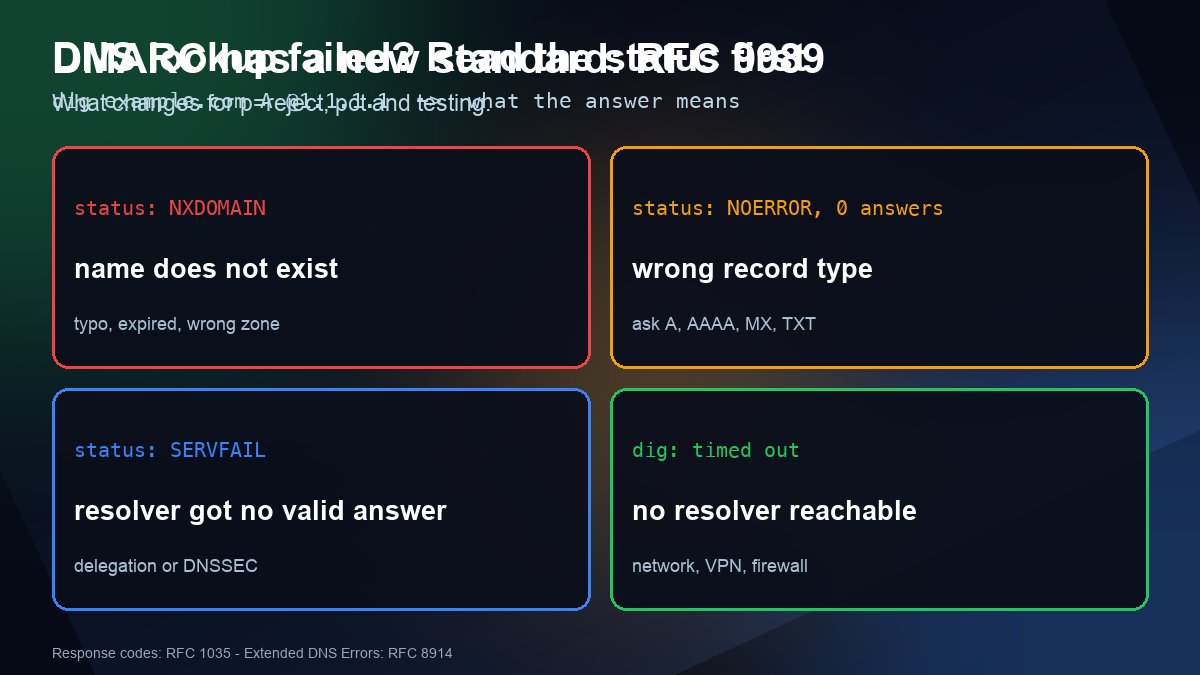
Look at the status: field in the header of the answer. It is the DNS response code (RCODE) defined in RFC 1035, and it tells you where to look next:
| What you see | Meaning | Where to look |
|---|---|---|
status: NXDOMAIN | The name does not exist in DNS. | Typo, expired domain, record never created, or a stale negative cache. |
status: NOERROR with ANSWER: 0 | The name exists but has no record of that type (often called NODATA). | Ask for the right type: A, AAAA, CNAME, MX or TXT. |
status: SERVFAIL | The resolver tried and failed to get a valid answer. | Broken delegation, dead authoritative servers, or DNSSEC validation failure. |
status: REFUSED | The server will not answer you. | You are querying a resolver that restricts clients, or a nameserver that is not authoritative for the zone. |
connection timed out; no servers could be reached | No reply at all. | Your network, firewall or VPN, or a wrong resolver address. |
A useful rule: if the public resolvers return an answer but your default resolver does not, the problem is local (your resolver, router, VPN or /etc/resolv.conf). If every resolver fails the same way, the problem is in the domain's DNS, and no setting on your computer will fix it.
What each common error message means
| Where you see it | Exact message | Usually means |
|---|---|---|
| curl | curl: (6) Could not resolve host: example.com | Any resolution failure (libcurl error CURLE_COULDNT_RESOLVE_HOST). It does not say whether it was NXDOMAIN, SERVFAIL or a timeout, so run dig. |
| Node.js | getaddrinfo ENOTFOUND example.com | The name did not resolve: NXDOMAIN or no address records. |
| Node.js, Docker, CI | getaddrinfo EAI_AGAIN example.com | A temporary failure: the resolver timed out or could not be reached. Retrying may work, and so may fixing the network. |
| Linux (ping, apt, git) | Temporary failure in name resolution | The same EAI_AGAIN condition from the C library: no working resolver is configured or reachable. |
| Linux (ssh, wget) | Name or service not known | The same as ENOTFOUND: the resolver answered, and the name is not there. |
| Python | socket.gaierror: [Errno -2] Name or service not known and [Errno -3] Temporary failure in name resolution | The two cases above, with -2 for "not found" and -3 for "try again" on Linux (glibc). |
| Windows ping | Ping request could not find host example.com. Please check the name and try again. | Name did not resolve. |
| Windows nslookup | DNS request timed out. timeout was 2 seconds. | The configured resolver did not reply. |
| Chrome | ERR_NAME_NOT_RESOLVED | Resolution failed in the browser. If the page says DNS_PROBE_FINISHED_NXDOMAIN, the name does not exist. |
The Linux wording comes from the C library function getaddrinfo, whose documented error codes EAI_NONAME ("name or service not known") and EAI_AGAIN ("temporary failure in name resolution") are explained in the getaddrinfo manual page. Most languages and tools simply print that code, which is why the same fault shows up in so many different outfits.
If it is NXDOMAIN: the name does not exist
Work through these in order, because the first one is the most common:
- Typo or wrong environment. A hostname in a config file,
.envor Kubernetes manifest that points toapi.staging.example.comwhen onlyapi-staging.example.comexists will fail everywhere. - The record was never created, or was created in the wrong zone. If you changed nameservers recently, the zone your registrar delegates to may not contain the record. Check the delegation with our nameserver lookup and look at the records with the DNS lookup tool; the walkthrough is in how to check a domain's nameservers.
- The domain expired or was suspended. Check registration status with the WHOIS lookup.
- Negative caching. If you queried a name before creating the record, resolvers may remember "does not exist" for a while. RFC 2308 lets resolvers cache that answer for a period based on the zone's SOA record, so the new record can look missing from some networks for minutes. See DNS propagation explained for how to wait it out safely.
If it is SERVFAIL: the resolver could not get a valid answer
SERVFAIL is the most misunderstood result because it points at a fault upstream of you. The usual causes are authoritative nameservers that do not answer (lame delegation), nameservers listed at the registrar that do not actually host the zone, and DNSSEC validation failures. Try these two commands:
dig example.com A +trace
dig example.com A @1.1.1.1 +cd
+trace walks from the root servers down and shows the step where it breaks. +cd sets "checking disabled", which asks the resolver to skip DNSSEC validation. If the plain query returns SERVFAIL but the +cd query returns an answer, the domain has a DNSSEC problem, typically a DS record at the registrar that no longer matches the zone's keys. Our DNSSEC check guide shows how to confirm the chain.
Modern resolvers can also explain themselves. Extended DNS Errors, defined in RFC 8914, add a code and sometimes text to a failure, and recent versions of dig print it as an EDE line. For example, code 22 is "No Reachable Authority" (the authoritative servers did not respond) and code 6 is "DNSSEC Bogus". If you see an EDE line, it is the quickest clue you will get.
If it is a timeout or EAI_AGAIN: you cannot reach a resolver
When even dig @1.1.1.1 times out, the DNS query never reaches a server or the reply never returns. Check the local path first:
- Linux with systemd-resolved:
resolvectl statusshows the servers in use for each interface, andresolvectl query example.comtests resolution through the same path your applications use. Runcat /etc/resolv.conftoo:127.0.0.53means the local stub is in charge, and an empty or missing nameserver line explains Temporary failure in name resolution immediately. - Windows:
ipconfig /alllists the DNS servers, andipconfig /flushdnsclears the local cache. - macOS:
scutil --dnslists resolvers per interface;sudo killall -HUP mDNSResponderclears the cache. - Docker and CI runners: inside the container,
cat /etc/resolv.conf. On a user-defined Docker network the resolver is Docker's embedded DNS at127.0.0.11, which forwards to the host's resolvers. A container that works on your laptop and fails in CI often inherits an unreachable corporate or VPN resolver. - VPN, firewall or captive portal: some block outbound UDP and TCP port 53, or hand out a private resolver that only answers internal names. Test with
dig +tcp example.com @1.1.1.1to see whether TCP gets through when UDP does not.
To test a specific server instead of the system default, see how to use nslookup with a specific DNS server.
A 60-second triage you can reuse
- Run
dig yourhost.com A @1.1.1.1and readstatus:. - Run the same query without
@. If only this one fails, fix your local resolver, VPN or router. - NXDOMAIN on both: fix the name or the zone. NOERROR with no answer: you asked for the wrong record type.
- SERVFAIL on both: run
+traceand+cd, then check delegation and DNSSEC. - Only after DNS is fixed, flush caches and retry the app. Restarting the app first just hides the evidence.
Intermittent EAI_AGAIN in a build or deploy pipeline is usually a resolver that is slow or overloaded rather than a wrong name. Retrying with a short back-off and pointing the runner at a reliable resolver is a legitimate fix there, but only after you have confirmed with dig that the name itself resolves.
Frequently asked questions
Is DNS lookup failed the same as no internet?
No. You can have a working connection and still get this error if DNS is misconfigured. Run ping 1.1.1.1: if that works but ping example.com does not, your network is fine and name resolution is the problem.
Why does the error come and go?
Usually one of several resolvers or authoritative nameservers is failing. Clients try them in turn, so some requests succeed. Query each authoritative nameserver listed for the domain with dig and compare the answers.
Can switching to 1.1.1.1 or 8.8.8.8 fix a failed lookup?
It fixes problems caused by your ISP or router resolver. It cannot fix a domain whose own DNS is broken, and it can stop internal-only names resolving on a corporate network.
How long should I wait after adding a DNS record?
If nobody queried the name before, it works as soon as the authoritative servers have the record. If a resolver cached that the name does not exist, the wait can be as long as the negative-caching period set by your zone SOA record (RFC 2308).