How to Check if a Domain Is DNSSEC-Signed (and Actually Validating)
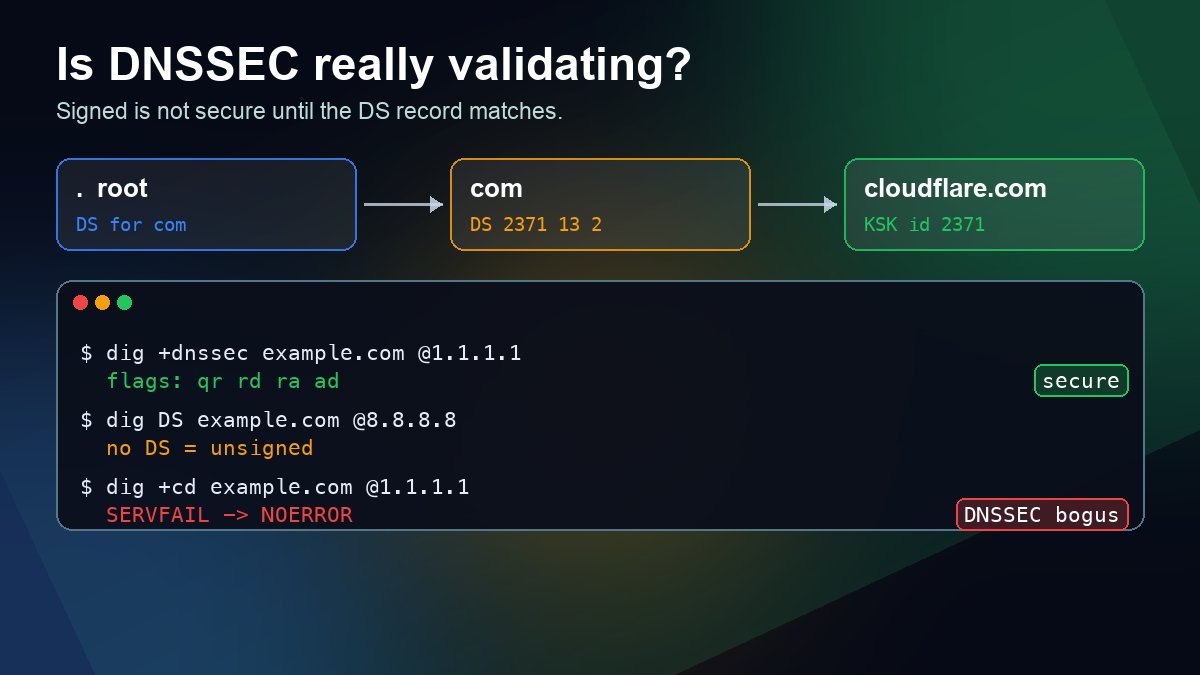
Short answer: ask a validating resolver and look at the flags. dig +dnssec example.com A @1.1.1.1 prints a flags: line; if it contains ad (authenticated data), the answer passed DNSSEC validation all the way from the root. Then run dig DS example.com @8.8.8.8. A DS record in the parent zone is what turns a signed zone into a validating one. No DS means resolvers treat the domain as unsigned, however many signatures the zone itself publishes.
This guide walks through the four checks that tell you which of the three states a domain is in (secure, unsigned or broken), using real output from queries we ran on 23 October 2026. If you want the theory first, start with DNSSEC explained and come back for the commands.
Signed is not the same as validating
A domain owner can switch on DNSSEC at their DNS host and see signatures appear in the zone, yet nothing changes for visitors. Validation needs an unbroken chain: the root vouches for the TLD, the TLD vouches for your domain through a DS record, and the DS must match a key (DNSKEY) in your zone. The DS record is added at your registrar, not at your DNS host, and that hand-off is where most setups stall.
A recent example shows how common this is. Pakistan's .pk zone became DNSSEC-signed in early October 2026, and a scan of 158,561 .pk domains on 11 October found just one that validated end to end. Another 1,230 had signed their own zones but had no DS record in the parent, so validating resolvers treated them as unsigned (CircleID, 20 October 2026). We checked the TLD side ourselves: dig DS pk @1.1.1.1 now returns key tag 34973 with the ad flag set.
Check 1: ask a validating resolver for the ad flag
Cloudflare (1.1.1.1), Google (8.8.8.8) and Quad9 (9.9.9.9) all validate DNSSEC. Query one of them directly, so you are not relying on whatever resolver your router uses (our guide to querying a specific DNS server covers the syntax):
dig +dnssec +multi cloudflare.com A @1.1.1.1Trimmed output from 23 October 2026:
;; ->>HEADER<<- opcode: QUERY, status: NOERROR, id: 43914
;; flags: qr rd ra ad; QUERY: 1, ANSWER: 3, AUTHORITY: 0, ADDITIONAL: 1
; EDNS: version: 0, flags: do; udp: 1232

;; ANSWER SECTION:
cloudflare.com.  300 IN A 104.16.132.229
cloudflare.com.  300 IN A 104.16.133.229
cloudflare.com.  300 IN RRSIG A 13 2 300 (
                 20261024110238 20261022090238 34505 cloudflare.com.
                 D1e+XWcyXJxVe/OEi63SN47ac40/uoXre9t76UJMzGgO ... )
Three things to read:
- ad in the flags line: the resolver validated the answer. This is the single most useful signal.
- do in the EDNS line: the
+dnssecoption asked for DNSSEC records, so the RRSIG signature is included in the answer. - The RRSIG line: algorithm 13 (ECDSA P-256 with SHA-256), then the expiry and inception timestamps (here 24 October 11:02 UTC and 22 October 09:02 UTC), then key tag 34505, the key that made the signature.
Run the same query for google.com and the flags line reads qr rd ra with no ad. That is not an error. google.com simply does not use DNSSEC, and the answer resolves normally.
Check 2: is there a DS record in the parent zone?
dig DS cloudflare.com @8.8.8.8 +noall +answer
cloudflare.com.  15878 IN DS 2371 13 2 32996839A6D808AFE3EB4A795A0E6A7A39A76FC52FF228B22B76F6D6 3826F2B9
The four fields after DS are the key tag (2371), the algorithm (13), the digest type (2 = SHA-256) and the digest of the key. For an unsigned domain you get status: NOERROR with ANSWER: 0 and only the TLD's SOA record in the authority section. That is what dig DS google.com @8.8.8.8 returned for us.
The 15878 is the remaining cache time at Google's resolver. Ask the TLD server itself (dig DS cloudflare.com @a.gtld-servers.net +norec) and you see the full TTL, 86400 seconds, for a .com DS record. Remember that number: a wrong DS can stay in caches for a whole day.
Check 3: does the zone's DNSKEY match the DS?
dig DNSKEY cloudflare.com @1.1.1.1 +noall +answer +multi
cloudflare.com. 644 IN DNSKEY 256 3 13 ( ... ) ; ZSK; alg = ECDSAP256SHA256 ; key id = 34505
cloudflare.com. 644 IN DNSKEY 257 3 13 ( ... ) ; KSK; alg = ECDSAP256SHA256 ; key id = 2371
Flag 257 marks the key-signing key (KSK) and 256 the zone-signing key (ZSK). The chain holds because the KSK's key id, 2371, equals the key tag in the DS record, and both use algorithm 13. The ZSK's id, 34505, matches the key tag in the RRSIG from check 1. If the DS key tag matches no DNSKEY in the zone, validating resolvers reject the domain.
Check 4: ask the authoritative nameserver
Find the nameservers (how to check a domain's nameservers), then query one without recursion:
dig cloudflare.com A @ns3.cloudflare.com +dnssec +norec
;; flags: qr aa; QUERY: 1, ANSWER: 3, AUTHORITY: 0, ADDITIONAL: 1
Here you want aa (authoritative answer) plus an RRSIG next to each record set. You will not see ad: authoritative servers serve signatures but do not validate them. If the RRSIG is missing here, the zone is not being signed. If it is present but the expiry timestamp is in the past, the signer has stopped refreshing it, and validating resolvers will start failing the domain.
What the results mean
| What you see | State | Effect on visitors |
|---|---|---|
| ad flag; DS key tag matches the KSK | Secure | Resolves; protected against spoofed answers |
| No DS, no DNSKEY | Unsigned (insecure) | Resolves normally, without DNSSEC protection |
| DNSKEY and RRSIG in the zone, no DS in the parent | Signed but not validating | Resolves normally, but validators treat it as unsigned |
| DS present, but no matching key or expired signatures | Bogus | SERVFAIL on every validating resolver |
The third row is the half-finished setup from the .pk scan: the fix is to add the DS record at the registrar. The fourth row is the dangerous one, because the domain goes dark for every user whose resolver validates.
Is DNSSEC behind a SERVFAIL? Use +cd
dnssec-failed.org is a test domain that is broken on purpose. Here is what a validating resolver says about it:
dig dnssec-failed.org A @1.1.1.1
;; ->>HEADER<<- opcode: QUERY, status: SERVFAIL, id: 59644
;; flags: qr rd ra; QUERY: 1, ANSWER: 0, AUTHORITY: 0, ADDITIONAL: 1
; OPT=15: 00 09 ... ("..no SEP matching the DS found for dnssec-failed.org.")
Now add +cd (checking disabled), which tells the resolver to skip validation:
dig +cd dnssec-failed.org A @1.1.1.1
;; ->>HEADER<<- opcode: QUERY, status: NOERROR, id: 6398
;; flags: qr rd ra cd; QUERY: 1, ANSWER: 1, AUTHORITY: 0, ADDITIONAL: 1
dnssec-failed.org.  300  IN  A  96.99.227.255
SERVFAIL normally, an answer with +cd: that combination means DNSSEC validation is the cause, not a dead nameserver. The OPT=15 line is an Extended DNS Error (RFC 8914). The first bytes, 00 09, are info-code 9, "DNSKEY Missing", and the text explains it: no key in the zone matches the DS. The older dig bundled with macOS prints the raw bytes, while newer BIND releases decode the code for you. Other DNSSEC codes you may meet are 6 (DNSSEC Bogus), 7 (Signature Expired) and 10 (RRSIGs Missing). For SERVFAILs that are not DNSSEC-related, see common DNS errors and fixes.
The same test works the other way round. If dnssec-failed.org resolves through your normal resolver, that resolver is not validating DNSSEC at all.
Windows, delv and browser tools
- Windows PowerShell:
Resolve-DnsName cloudflare.com -Type A -Server 1.1.1.1 -DnssecOksets the DNSSEC OK bit, so RRSIG records are listed with the answer.-DnssecCdsets checking-disabled, the same test asdig +cd. - delv: on Linux systems with a current BIND 9 package,
delv @1.1.1.1 example.com Avalidates the chain itself and prints; fully validatedor; unsigned answer. The old copy bundled with macOS stopped with "no crypto support" when we tried it, so stick with dig there. - Online: DNSViz (dnsviz.net) draws the whole chain from the root and marks the broken link. Verisign Labs' DNSSEC Debugger gives a plain pass/fail list. Our DNS lookup tool is handy for quick record checks next to them.
Before you change DNS provider or registrar
Most bogus domains are self-inflicted during a move. If you change the domain's nameservers to a new DNS host while the old DS record stays at the registrar, validating resolvers look for a key the new host does not have. Either remove the DS at the registrar first and wait out its TTL (a day for .com) before switching, or turn on DNSSEC at the new host and publish its DS in the same change. Our nameserver change guide and domain transfer checklist show where this fits in the order of steps. Once the change is made, cached DS records explain why some networks fail before others, the same timing covered in DNS propagation explained.
FAQ
Does nslookup show whether DNSSEC is working?
No. nslookup does not display the DNS header flags, so you cannot see ad. Use dig, delv or Resolve-DnsName instead.
Is an unsigned domain a problem?
It still works everywhere. It just lacks protection against forged answers. A broken setup is worse than no DNSSEC, so finish the DS step properly or leave DNSSEC off.
Why does the ad flag disappear when I query my router?
Many home routers and some ISP resolvers forward queries without validating, or strip the flag. Test against 1.1.1.1, 8.8.8.8 or 9.9.9.9 to see the real state of the domain.
Sources: RFC 4033–4035 (DNSSEC records and validation); RFC 8914 (Extended DNS Errors); Microsoft Learn, "Resolve-DnsName" (DnssecOk and DnssecCd parameters); BIND 9 documentation for dig and delv; CircleID, "Pakistan's .PK Is Now DNSSEC-Signed, but Only One Domain Validates" (20 October 2026). Example output from live queries run 23 October 2026 on macOS with DiG 9.10.6. Keys, signatures and TTLs change over time, so your output will differ.