How to Point a Domain to Vercel, Netlify or GitHub Pages (A vs CNAME vs ALIAS)
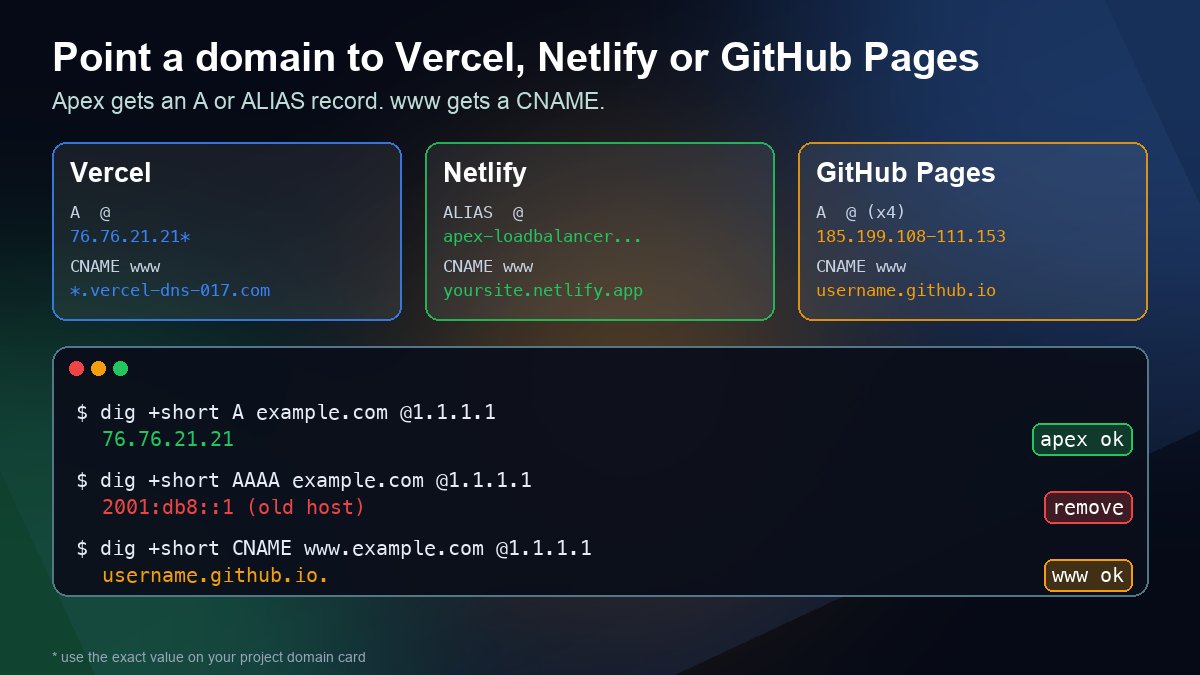
Short answer: the apex domain (example.com) cannot be a CNAME, so it gets an A record (or an ALIAS/ANAME/flattened CNAME if your DNS provider supports one), and www gets a CNAME to the host. The values for each platform:
| Host | Apex (@) | www or other subdomain |
|---|---|---|
| Vercel | A record with the value on your project's domain card (usually 76.76.21.21; newer projects may show another, such as 216.198.79.1) | CNAME to the target on the domain card, for example d1d4fc829fe7bc7c.vercel-dns-017.com |
| Netlify | ALIAS/ANAME/flattened CNAME to apex-loadbalancer.netlify.com, or the fallback A record 75.2.60.5 | CNAME to your site's yoursite.netlify.app name |
| GitHub Pages | Four A records: 185.199.108.153, 185.199.109.153, 185.199.110.153, 185.199.111.153 (plus the matching AAAA records if you want IPv6), or ALIAS to username.github.io | CNAME to username.github.io (or orgname.github.io) |
Add the domain in the host's dashboard first, then create the records at whoever runs your DNS, then check them with dig before you wait on SSL. The rest of this guide covers each platform's details, the records you must delete, and how to tell what is wrong when the dashboard keeps saying the configuration is invalid.
Why the apex and www need different records
A CNAME says "this name is really that other name", and the DNS rules do not let a CNAME share a name with any other record (RFC 1912, section 2.4). The apex of every zone already has an SOA record and NS records, so a CNAME there is not allowed. That leaves two options for example.com:
- A record (and AAAA for IPv6): a fixed IP address the host publishes. Works with every DNS provider.
- ALIAS, ANAME or CNAME flattening: a provider feature, not a standard record type. You enter a hostname, and the provider looks it up and answers with plain A/AAAA records. Netlify recommends this because it follows the host if its addresses change.
Subdomains such as www or blog have no SOA or NS records, so they can use a normal CNAME. If you are unsure which record type fits a given name, our A record vs CNAME guide walks through the rule in more detail.
Before you touch DNS: two checks
- Find out who actually serves your DNS. Records added at your registrar do nothing if your nameservers point somewhere else, such as Cloudflare. Run a nameserver lookup or
dig +short NS example.comand edit records at the provider those names belong to. - Write down the records you have now. Export or screenshot the zone. Pointing a website at a new host should touch only the apex A/AAAA records and the
wwwCNAME. Your MX and TXT records (email, SPF, DKIM, verification) stay as they are. If you later move nameservers to the host instead, those email records must be recreated there first; see how to set up MX records.
Lowering the TTL on the records you are about to change to 300 seconds a few hours ahead also makes a mistake much quicker to undo.
Vercel
Add the domain under your project's Settings > Domains. Vercel then shows a domain card with the exact records it expects. Use those values, not ones copied from a forum post. Vercel's own guide, last updated on October 16, 2026, says most projects use 76.76.21.21, but newer projects get an address from a pool, such as 216.198.79.1, and verification checks for the exact value on your card.
| Type | Name | Value |
|---|---|---|
| A | @ | The IP on your domain card (often 76.76.21.21) |
| CNAME | www | The CNAME target on your card, for example d1d4fc829fe7bc7c.vercel-dns-017.com |
Things that trip people up on Vercel:
- Delete apex AAAA records. Vercel does not support IPv6 for domains that use a third-party DNS provider. A leftover AAAA record that points at your old host splits visitors between two servers and can stop the SSL certificate from being issued.
- Check CAA records. If your zone has CAA records, one must allow
letsencrypt.org, or certificate issuance fails. - Older guides use
cname.vercel-dns.com. When we looked it up on October 26, 2026, it answered with76.76.21.93and66.33.60.194, not76.76.21.21. That is a good reminder not to copy an IP out of a CNAME target into an A record. Use the documented value for each record type. - Wildcards such as
*.example.comneed Vercel's nameservers (ns1.vercel-dns.comandns2.vercel-dns.com) or the certificate-delegation records the dashboard shows, because Vercel has to answer the certificate challenge for every subdomain.
Netlify
Add the domain under Domain management for the site. If you add either the apex or www, Netlify automatically adds both, so plan to configure both. According to Netlify's external DNS docs:
| Type | Name | Value |
|---|---|---|
| ALIAS / ANAME / flattened CNAME (recommended) | @ | apex-loadbalancer.netlify.com |
| A (fallback if no ALIAS support) | @ | 75.2.60.5 |
| CNAME | www | yoursite.netlify.app |
Use one apex option, not both. Sites on Netlify's High-Performance Edge use different load-balancer values, which are shown in the Pending DNS verification dialog, so check there before copying the table above. On October 26, 2026, apex-loadbalancer.netlify.com resolved to 75.2.60.5 and 99.83.231.61. That is why the ALIAS route is more resilient: if Netlify changes those addresses, your provider follows automatically.
GitHub Pages
Set the custom domain under the repository's Settings > Pages first. If you publish from a branch, GitHub commits a CNAME file to the repository. If you publish with a custom GitHub Actions workflow, no file is created and none is needed. Then add the records from GitHub's custom domain docs:
| Type | Name | Value |
|---|---|---|
| A (add all four) | @ | 185.199.108.153, 185.199.109.153, 185.199.110.153, 185.199.111.153 |
| AAAA (optional, all four) | @ | 2606:50c0:8000::153, 2606:50c0:8001::153, 2606:50c0:8002::153, 2606:50c0:8003::153 |
| CNAME | www | username.github.io (no repository name) |
Two GitHub-specific rules matter for security. First, do not use wildcard records such as *.example.com. GitHub warns that they put you at immediate risk of a domain takeover. Second, verify the domain under your account's Pages settings. GitHub gives you a TXT record at _github-pages-challenge-USERNAME.example.com, and once it is verified, other accounts cannot use your domain or its immediate subdomains for their own Pages sites (GitHub: verifying your custom domain). When the certificate is ready, tick Enforce HTTPS.
Check the records yourself
Do not trust the dashboard alone. Ask DNS directly, and ask a public resolver so your local cache is not involved:
dig +short A example.com @1.1.1.1
dig +short AAAA example.com @1.1.1.1
dig +short CNAME www.example.com @1.1.1.1
dig +short CAA example.com @1.1.1.1
On Windows, nslookup -type=A example.com 1.1.1.1 gives the same answer, or use our DNS lookup tool. What you want to see:
- The apex returns only the host's addresses. One extra IP, usually from a parking page or the previous host, means some visitors get the old site and certificate checks fail at random.
- The AAAA query is empty for Vercel, matches GitHub's four addresses for GitHub Pages, or is empty.
wwwreturns your CNAME target, not an A record left over from the old host.- CAA is empty, or it includes
letsencrypt.org.
If the answers are right but your browser still shows the old site, it is caching, not configuration. How DNS propagation works explains why, and how long the old TTL keeps the old answer alive.
When the dashboard still says "Invalid Configuration"
- Records at the wrong provider. The most common cause. Check the nameservers again and edit the zone there.
- A conflicting record with the same name. Many providers create a default
@A record or awwwA record for a parking page. Delete it, becausewwwcannot have both an A record and a CNAME. - The provider appended your domain. A CNAME value typed as
username.github.iowithout a trailing dot can becomeusername.github.io.example.comon some panels.dig +short CNAME www.example.comshows exactly what was saved. - A proxy in front. If the record is proxied through a CDN (the orange cloud in Cloudflare), DNS answers with the CDN's addresses, so the host's check never sees the values it asked for. Set the record to DNS only while you connect the domain; our Cloudflare DNS setup guide shows where that switch is.
- Not propagated yet. If a public resolver already returns the right values, give the host's check some time, or use its refresh or verify button.
Once DNS is correct, the host issues the certificate. You can confirm it with our SSL checker.
FAQ
Should I point nameservers to the host instead?
You can. Vercel and Netlify both offer their own DNS, and it removes the guesswork about which values to use. The trade-off is that the whole zone, including email records, then lives with your web host. If your registrar or Cloudflare already runs your DNS well, changing two records is the smaller change. If you do move, follow how to change nameservers and copy every existing record across first.
Which should be the main address, apex or www?
Either works. Pick one, make the other redirect to it in the host's domain settings, and keep it that way so links and search results stay consistent.
Why did it work for me but not for a friend?
Different resolvers cached the old record at different times. Until the old TTL runs out, two people can see two different sites. Check with @1.1.1.1 and @8.8.8.8. If both are correct, it is only a matter of waiting.
Does this affect my email?
Not if you only change the apex A/AAAA records and the www CNAME. Email depends on MX and TXT records, which this change does not touch. For the full list of records a domain usually needs, see what DNS records a website needs.
Sources
- Vercel: Can I use my domain on Vercel with A records? (updated 16 Oct 2026)
- Vercel: Troubleshooting domains
- Netlify: Configure external DNS for a custom domain
- GitHub Docs: Managing a custom domain for your GitHub Pages site
- GitHub Docs: Verifying your custom domain for GitHub Pages
- RFC 1912, section 2.4: CNAME records