SPF Record for Google Workspace: The Exact Value and How to Merge It
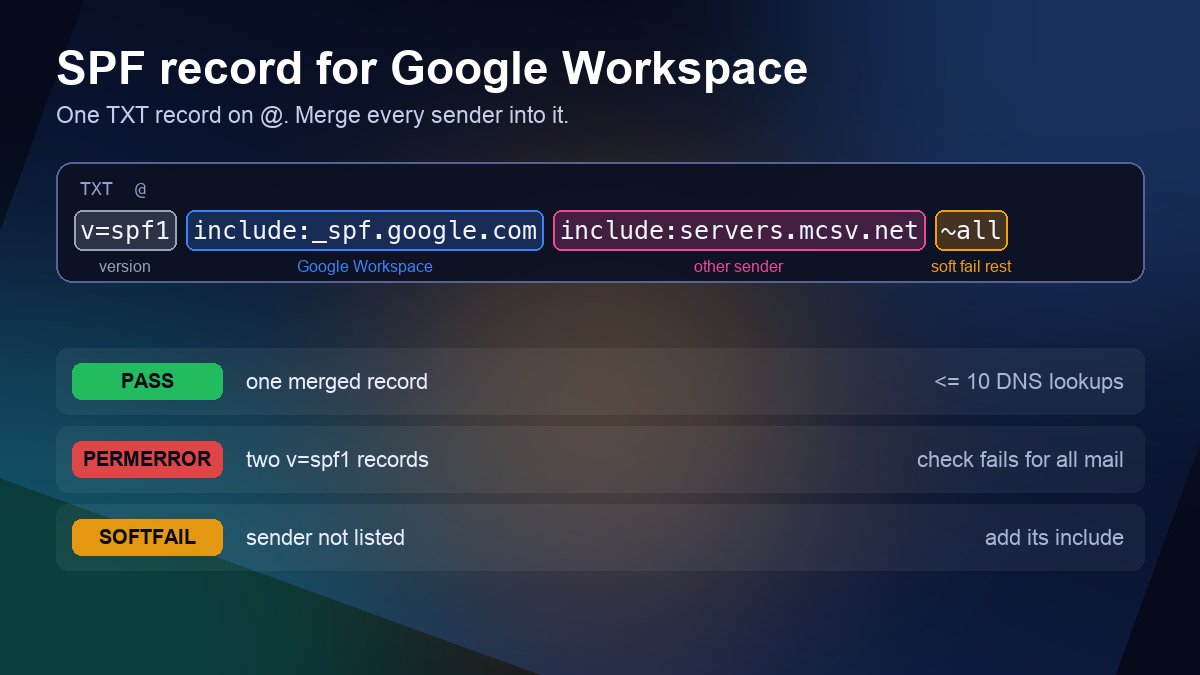
Short answer: if Google Workspace is the only service that sends email for your domain, publish one TXT record on the root domain (host @) with the value v=spf1 include:_spf.google.com ~all. That is the exact value in Google's own setup guide. If anything else also sends mail as your domain, such as a newsletter tool, a help desk or your website's contact form, you do not add a second SPF record. You merge every sender into that one record. This guide shows the exact syntax, how to merge it with other services without breaking the 10-lookup limit, and how to confirm that Gmail actually sees spf=pass.
The exact record to add
At the company that hosts your DNS (the provider your nameservers point to, which is not always your registrar), create this record:
| Field | Value |
|---|---|
| Type | TXT |
| Host / Name | @ (the root domain; some panels want the bare domain name or leave it blank) |
| Value | v=spf1 include:_spf.google.com ~all |
| TTL | Default, or 3600 seconds |
Read it left to right: v=spf1 says this is an SPF policy, include:_spf.google.com authorises the servers Google publishes for Workspace mail, and ~all asks receivers to treat mail from any other server as a soft fail, which usually means extra scrutiny or the spam folder rather than an outright rejection. Some DNS panels add the surrounding quotation marks for you and some expect you to type them, so check how existing TXT records in the same panel look before saving.
Google notes two cases where you may not need to do anything: domains that already have SPF set up by default, and domains bought from a Google partner during Workspace sign-up. Check first with a TXT lookup, because adding a second record on top of an existing one is the most common way to break SPF.
~all or -all for Google Workspace?
Google's setup guide recommends ~all. Hard fail (-all) tells receivers to reject anything not listed, which sounds stricter and better, but it punishes you for every sender you forgot: an invoicing tool, a CRM, a printer that emails scans. In practice the policy that stops spoofing is DMARC, which looks at SPF and DKIM together and lets you move from monitoring to rejection with reports to guide you. Keep SPF at ~all, add DKIM and DMARC, and let DMARC do the enforcing. Our SPF, DKIM and DMARC setup guide covers that rollout.
Merging Google Workspace with other senders
A domain may publish only one SPF record. RFC 7208 says that if a receiver finds more than one record starting with v=spf1, the result is a permanent error, so the check fails for every message, including genuine Workspace mail. When you add a service, edit the existing record and insert its mechanism before the all at the end. Google's help page lists ready-made combinations; these are the most common:
- Workspace + Microsoft 365:
v=spf1 include:_spf.google.com include:spf.protection.outlook.com ~all - Workspace + Mailchimp:
v=spf1 include:_spf.google.com include:servers.mcsv.net ~all - Workspace + Amazon SES:
v=spf1 include:_spf.google.com include:amazonses.com ~all - Workspace + Zendesk:
v=spf1 include:_spf.google.com include:mail.zendesk.com ~all - Workspace + your own server:
v=spf1 include:_spf.google.com ip4:192.0.2.25 ~all, using the server's real public IP in place of the documentation address.
Always copy the include value from the sending service's current documentation rather than from an old blog post, because providers do change them. One example from our own checks on 21 October 2026: shops.shopify.com, still listed in many guides, published only v=spf1 ~all, meaning it authorised no servers at all. Including it costs you a lookup and adds nothing. Services that send from their own return-path domain, as many newsletter and store platforms now do, often need a DKIM or CNAME record from you rather than an SPF include.
Stay under the 10 DNS lookup limit
RFC 7208 caps an SPF evaluation at 10 mechanisms that need extra DNS queries: include, a, mx, ptr, exists and the redirect modifier. Includes inside includes count too. Plain ip4 and ip6 entries cost nothing. Go over 10 and the result is a permanent error, which looks the same to Gmail as having no valid SPF at all.
Here is what common includes cost, based on the records each one published when we queried them on 21 October 2026:
| Include | Lookups used | Why |
|---|---|---|
_spf.google.com | 1 | A flat list of Google IPv4 and IPv6 ranges, no nested includes |
spf.protection.outlook.com | 1 | Flat list of Microsoft ranges |
servers.mcsv.net | 1 | Three Mailchimp IPv4 ranges |
amazonses.com | 1 | Flat list of SES ranges |
sendgrid.net | 2 | Nests include:ab.sendgrid.net |
_spf.salesforce.com | 2 | Uses an exists mechanism |
secureserver.net | 2 or more | Nests a further GoDaddy include |
So Workspace plus two or three typical services is nowhere near the limit. Trouble starts when a record collects years of trials: an a and an mx mechanism nobody needs any more (with Workspace, mx points at Google's inbound mail servers and authorises nothing you need), plus includes for tools you cancelled. Remove what you no longer use before trying tricks such as SPF flattening services, which swap includes for IP lists that silently go stale when the provider changes ranges.
Mistakes that break Google Workspace SPF
- A second record instead of a merged one. Typically your web host or old email provider left
v=spf1 a mx ~allin place and you added the Google one beside it. Delete the old one after merging anything still needed into the new record. - Outdated include values. Older tutorials used
include:aspmx.googlemail.com, and some people tryinclude:gmail.com. Useinclude:_spf.google.comas Google documents today. - The record on the wrong host. SPF is checked on the domain in the envelope sender (the return path). For
you@example.comthat isexample.com, so the record goes on@, not onwwwormail. If you also send asyou@team.example.com, that subdomain needs its own SPF record, because SPF is not inherited. - Typing the domain into the host field. Some panels append the domain automatically, turning
example.comintoexample.com.example.com. Look up the result to be sure. - Using the old SPF record type. A few panels still offer a record type called SPF. RFC 7208 retired it; publish SPF as TXT only.
- Expecting SPF alone to fix spam placement. Since February 2024, Google requires SPF or DKIM for all senders to Gmail, and SPF, DKIM and DMARC for anyone sending more than 5,000 messages a day to Gmail accounts. Turn on DKIM in the Admin console as well.
How to check that it works
First confirm the record is published and that there is exactly one. On macOS or Linux run dig example.com TXT +short and look for a single line starting with v=spf1, or use our DNS Lookup tool and choose TXT. If you just changed the record and still see the old value, the previous answer is cached until its TTL runs out; our guide to DNS propagation explains the wait, and Google says SPF can take up to 48 hours to start working.
Then test with a real message. Send an email from your Workspace account to a personal Gmail address, open it, choose Show original from the three-dot menu and read the summary at the top. You want SPF: PASS with your domain and Google's sending IP. softfail means the sending server is not in your record; permerror usually means two records or more than 10 lookups. If messages still land in spam once SPF passes, check DKIM and DMARC next and look at our guide to email deliverability and DNS records. It is also worth checking the sending IP against public block lists with our Blacklist Checker.
FAQ
Do I need an SPF record if I only receive email with Google Workspace?
Receiving mail depends on your MX records, not SPF. You still want SPF the moment anyone sends from the domain, and without it others can more easily send mail that pretends to be you. If a domain never sends mail at all, publish v=spf1 -all on it instead.
Can I have one SPF record for Google and another for Microsoft 365?
No. Two SPF records on the same name is a permanent error under RFC 7208. Combine them: v=spf1 include:_spf.google.com include:spf.protection.outlook.com ~all.
Does the order of includes matter?
Not for the result. Receivers stop at the first mechanism that matches, so putting your main sender first can save a query or two, but the pass or fail outcome is the same. What matters is that ~all stays at the very end, because anything after it is ignored.
Sources: Google Workspace Admin Help "Set up SPF" (checked 21 October 2026) and "Email sender guidelines"; RFC 7208, Sender Policy Framework (SPF) for Authorizing Use of Domains in Email, Version 1; live TXT lookups of each listed include on 21 October 2026. Example addresses use the reserved documentation range 192.0.2.0/24 and the example.com domain.