What DNS Records Does a Website Need? The Minimum Set Explained
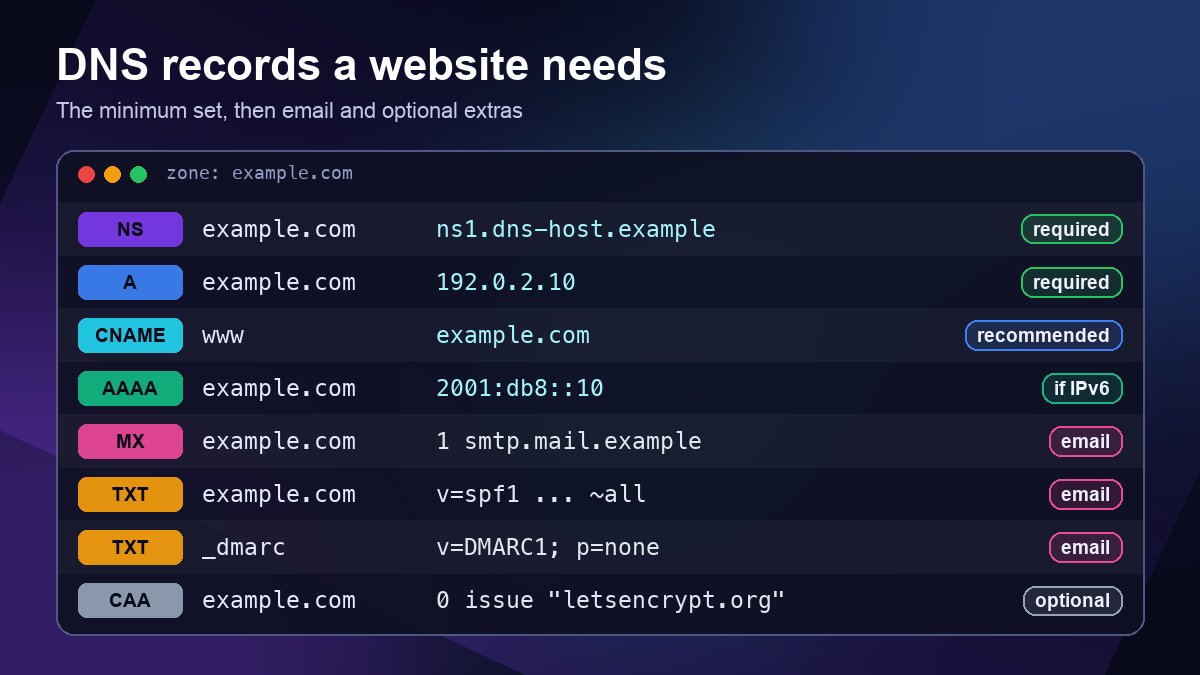
Short answer: a website needs surprisingly few DNS records to work. At minimum you need working nameservers (set at your registrar), an A record for the root domain that points to your web server's IPv4 address, and a record for www, usually a CNAME or a second A record. Add an AAAA record if your host supports IPv6. Everything else depends on what the domain does: email needs MX, SPF, DKIM and DMARC, and a few optional records such as CAA and verification TXT records harden or extend the setup. This guide walks through each record, shows a complete minimal zone you can adapt, and lists the mistakes that most often break a new site.
The minimum set at a glance
- Required: NS delegation, SOA (created by your DNS host), and an A record (or ALIAS/flattened record) on the root domain.
- Strongly recommended: a www record, plus AAAA if the server really answers on IPv6.
- Only for email: MX, SPF, DKIM and DMARC, or a "no mail" set if the domain never sends email.
- Optional: CAA, verification TXT records and DNSSEC.
1. Nameservers: the record that makes everything else visible
None of your other records matter until the domain is delegated to a DNS provider. You set nameservers at your registrar, and the registry for the TLD publishes them as NS records in the parent zone. Your DNS provider publishes matching NS records inside your own zone. If the two lists disagree, some resolvers will see your records and others will not, which is one of the hardest problems to debug.
Use at least two nameservers. RFC 1034 requires every zone to be available on at least two servers, and most providers assign two to four. You can confirm what the world currently sees with our Nameserver Lookup tool, or follow our guide on how to check what nameservers a domain is using. If you need to move the domain to a new DNS host first, see how to change nameservers.
2. SOA: created for you, worth understanding
Every zone has one SOA (Start of Authority) record naming the primary nameserver, a contact mailbox, a serial number and several timers. Managed DNS providers maintain it for you. One detail is worth knowing: the last SOA value helps set how long resolvers cache a "this name does not exist" answer (RFC 2308), which is why a brand-new subdomain that someone looked up too early can seem slow to appear.
3. A and AAAA records for the root domain
The A record maps your bare domain to an IPv4 address, for example example.com. A 192.0.2.10. Your hosting provider gives you this address. Some platforms give you several addresses for redundancy, in which case you add one A record per address.
The AAAA record does the same for IPv6. Add it only when your host confirms the site is reachable over IPv6. A wrong or stale AAAA record is worse than none: devices on IPv6-capable networks may try it first and then stall or fail to connect, while IPv4-only testers see nothing wrong. Our IPv6 DNS configuration guide covers how to test both paths.
4. The www record, and why the root cannot be a CNAME
For www the usual choice is a CNAME pointing to the root domain or to a hostname your platform gives you, such as a CDN or site-builder target. A CNAME means "this name is an alias; look up that other name instead", so when the host changes its IP addresses you do not have to touch anything.
The root domain is different. A CNAME cannot coexist with any other record at the same name (RFC 1912, section 2.4), and the root always carries SOA and NS records, so a plain CNAME is not allowed there. If your platform asks you to point the root at a hostname, use your DNS provider's workaround: CNAME flattening, ALIAS or ANAME records. These resolve the target behind the scenes and answer with ordinary A and AAAA records. Cloudflare, for example, documents CNAME flattening as the feature that lets you use a CNAME at the zone apex. Our comparison of A records and CNAMEs explains the trade-offs in more detail.
DNS does not redirect visitors. Pointing both names at the same server only makes both reachable; sending one to the other is an HTTP 301 redirect on the server or CDN.
5. Email records: only if the domain handles mail
If you use the domain for email, four records do the work:
- MX tells other servers where to deliver mail for your domain. Your email provider gives you the exact values. For Google Workspace, for instance, the MX value is
smtp.google.com. See our guide to setting up MX records. - SPF is a TXT record on the root domain listing which servers may send mail as you, such as
v=spf1 include:_spf.google.com ~all. Publish exactly one SPF record per name. Two separate SPF records cause a permanent error under RFC 7208, so merge all your senders into one. - DKIM is a TXT (or CNAME) record at a selector name such as
google._domainkey.example.com, holding the public key your provider generates. - DMARC is a TXT record at
_dmarc.example.com, for examplev=DMARC1; p=none; rua=mailto:dmarc@example.com. Start withp=noneto collect reports, then move toquarantineorrejectonce your legitimate mail passes.
For anyone sending to Gmail these are not optional: Google's sender guidelines require every sender to set up SPF or DKIM, and senders of more than 5,000 messages a day to Gmail accounts need SPF, DKIM and DMARC. Our SPF, DKIM and DMARC setup guide walks through each record step by step.
6. If the domain never sends email, say so
Domains used only for a website are popular targets for spoofing, because nothing stops someone from forging their address. Three small records close the gap:
example.com.         MX   0 .
example.com.         TXT  "v=spf1 -all"
_dmarc.example.com.  TXT  "v=DMARC1; p=reject"
The first is a "null MX" (RFC 7505), which announces that the domain accepts no mail, so senders stop trying to deliver to your web server's address. The SPF record says no server may send as you, and the DMARC policy tells receivers to reject mail that claims otherwise.
7. Optional records worth adding
- CAA lists which certificate authorities may issue SSL certificates for your domain (RFC 8659), for example
example.com. CAA 0 issue "letsencrypt.org". Check which CA your host or CDN uses first: a CAA record that leaves it out will block automatic certificate renewal. You can verify your certificate afterwards with our SSL Checker. - Verification TXT records prove domain ownership to services such as Google Search Console or an email provider. They are harmless to keep while the service is in use.
- DNSSEC signs your zone so resolvers can detect forged answers. It needs a DS record at the registrar, so enable it only when both your DNS host and registrar support it. See DNSSEC explained.
A complete minimal zone you can adapt
Here is what a small business site with Google Workspace email typically needs, using documentation-only addresses (replace them with your own values):
example.com.         NS     ns1.dnsprovider.example.
example.com.         NS     ns2.dnsprovider.example.
example.com.         A      192.0.2.10
example.com.         AAAA   2001:db8::10
www.example.com.     CNAME  example.com.
example.com.         MX     1 smtp.google.com.
example.com.         TXT    "v=spf1 include:_spf.google.com ~all"
google._domainkey.example.com.  TXT  "v=DKIM1; k=rsa; p=(your key)"
_dmarc.example.com.  TXT    "v=DMARC1; p=none; rua=mailto:dmarc@example.com"
example.com.         CAA    0 issue "letsencrypt.org"
The SOA record is not shown because your DNS host manages it. Drop the AAAA line if your server has no IPv6, and drop the CAA line if you are unsure which CA your host uses.
Records most websites do not need
PTR (reverse DNS) records live in the zone of whoever owns the IP address, usually your hosting provider, and matter for mail servers rather than websites (see our reverse DNS guide). SRV records are needed only when a service such as a VoIP or chat system asks for them, and wildcard records (*.example.com) should be added only on purpose, because they make every mistyped subdomain resolve.
How to check your records and avoid common mistakes
After saving your records, look them up from outside your own network. On macOS or Linux, dig example.com A +short, dig www.example.com +short and dig example.com MX +short show the live answers, or use our DNS Lookup tool to check each record type in the browser. The mistakes we see most often:
- Adding a CNAME on the root domain, which many DNS hosts reject and which breaks MX and TXT records where it is accepted.
- Two SPF records after adding a second email service, instead of one merged record.
- An old A record left behind after moving hosts, so some visitors still reach the previous server.
- Forgetting the www record, so
www.example.comfails while the bare domain works. - Making changes with a long TTL. Lower the TTL to around 300 seconds a day before a planned move, then raise it again once things are stable. Our article on DNS propagation explains why changes take time, and common DNS errors and fixes helps if something still fails.
FAQ
Does a website need an MX record?
No. A website loads without one. You need MX only to receive email at the domain. If you do not use email there, publishing a null MX is better than leaving it empty, because senders then stop trying to deliver to your web server.
Where do I add these records?
At whichever company your nameservers point to. That is often your registrar, but if you moved DNS to a host or CDN such as Cloudflare, records added at the registrar are ignored. Check your nameservers first so you know which dashboard is live.
Sources: RFC 1034 (Domain Names: Concepts and Facilities), RFC 1912 (Common DNS Operational and Configuration Errors), RFC 2308 (Negative Caching of DNS Queries), RFC 7208 (SPF), RFC 7505 (Null MX), RFC 8659 (CAA); Google Workspace Help "Set up MX records for Google Workspace" and "Email sender guidelines"; Let's Encrypt documentation on CAA; Cloudflare documentation on CNAME flattening. Example values use the reserved documentation ranges 192.0.2.0/24 and 2001:db8::/32.