DKIM Record Lookup: Find Your Selector and Verify the Key
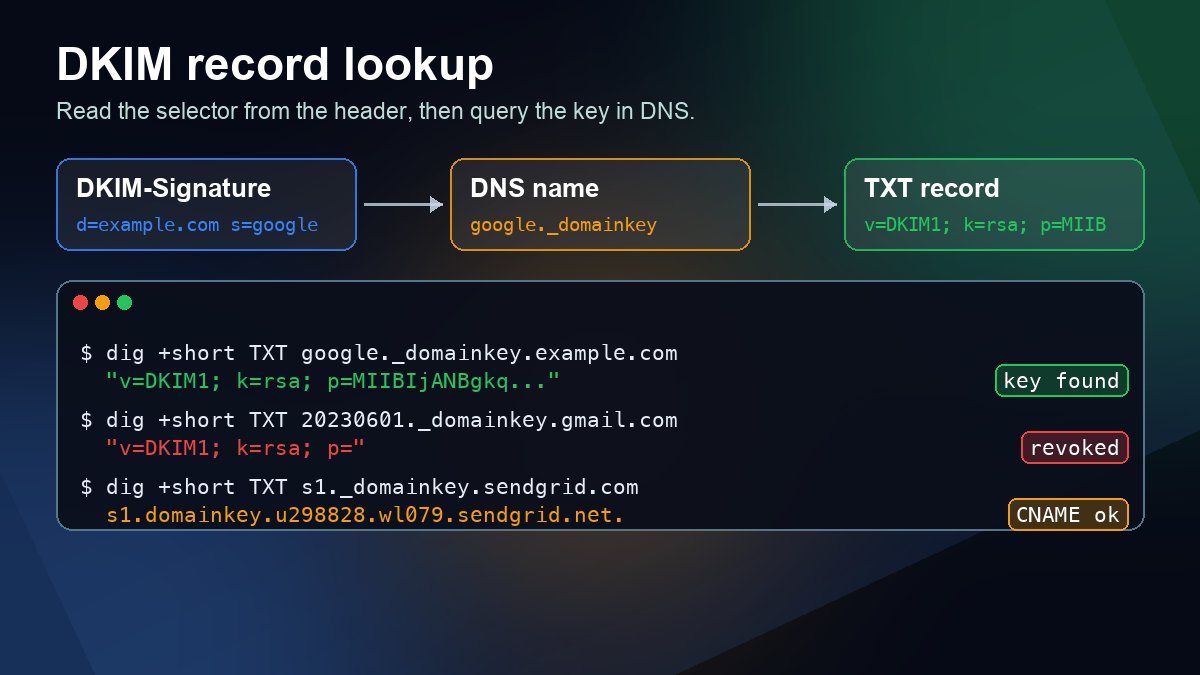
Short answer: A DKIM record lives at selector._domainkey.yourdomain.com, so you cannot look it up until you know the selector. Get the selector from a real message: open the full headers of an email your domain sent, find the DKIM-Signature header and read two tags, d= (the signing domain) and s= (the selector). Then query the TXT record at s._domainkey.d:
dig +short TXT google._domainkey.example.com
If you get back a string with a long p= value, the public key is published. If you get nothing, the selector or domain is wrong, the record was never added, or the change has not reached your resolver yet. The rest of this guide shows where to find the headers in Gmail, Outlook and Apple Mail, the lookup commands for every platform, how to read the record, and what each failure means.
What a DKIM pass does (and does not) prove
This week is a good reminder of what DKIM is for. On October 22, 2026, Help Net Security reported on Cisco Talos research into scams delivered through legitimate platforms: fake order confirmations that were sent by real retailer systems, so they passed DKIM and DMARC. DKIM answers one narrow question: which domain signed this message, and was the signed content changed after signing? It does not say the content is honest. Reading the d= value and looking up the key yourself tells you exactly who took responsibility for a message, nothing more.
For your own domain, the lookup matters for a plainer reason. Under the Gmail email sender guidelines, every sender to Gmail needs SPF or DKIM, and anyone sending more than 5,000 messages a day to Gmail accounts needs SPF, DKIM and DMARC. A missing or broken DKIM key usually shows up as rejected or spam-foldered mail long before anyone thinks to check DNS.
Step 1: Find the selector and signing domain
DNS gives you no way to list every name under _domainkey, so guessing selectors is slow and proves nothing when it fails. The selector is written into every signed message, so start there. Send a test email from the domain you want to check to a mailbox at another provider, then open the full headers:
- Gmail on the web: open the message, click More (the three dots) next to Reply, then Show original. The summary at the top already lists the DKIM result and domain; the raw header is below it (Google's steps).
- New Outlook for Windows and Outlook on the web: select More actions at the top of the message, then View > View message details (Microsoft's steps).
- Apple Mail: open the message, then choose View > Message > All Headers.
Search the header text for DKIM-Signature. A Google Workspace signature looks like this (shortened):
DKIM-Signature: v=1; a=rsa-sha256; c=relaxed/relaxed;
        d=example.com; s=google; t=1761386400;
        h=to:subject:message-id:date:from:mime-version;
        bh=...; b=...
Here d=example.com is the signing domain and s=google is the selector, so the public key lives at google._domainkey.example.com. A message can carry more than one DKIM-Signature header, for example your domain's signature plus one added by the email service that sent it. Look them all up. The one whose d= matches the domain in the visible From address is the one DMARC cares about.
Then read the receiving server's verdict in the Authentication-Results header. It names the exact signature it checked:
Authentication-Results: mx.google.com;
       dkim=pass header.i=@example.com header.s=google header.b=AbCdEf12;
       spf=pass ...;
       dmarc=pass (p=NONE sp=NONE dis=NONE) header.from=example.com
Default selectors used by common senders
If you cannot get a message, these defaults are a reasonable first guess. Your own setup may differ, so a real header always wins.
| Sending service | Default selector(s) | What you publish |
|---|---|---|
| Google Workspace | google (you can choose another prefix when you generate the key) | TXT record with the public key |
| Microsoft 365 | selector1 and selector2 | Two CNAME records pointing to Microsoft-hosted names |
| SendGrid | s1 and s2 | CNAME records pointing to sendgrid.net names |
With CNAME-based providers the TXT key itself sits in the provider's DNS. Your lookup follows the CNAME automatically, so seeing a CNAME line before the key is expected, not an error. Microsoft's DKIM guide explains why Microsoft 365 uses CNAME records for this.
Step 2: Query the DKIM record
Swap in your own selector and domain.
macOS and Linux (dig):
dig +short TXT google._domainkey.example.com
Windows Command Prompt (nslookup):
nslookup -type=TXT google._domainkey.example.com
Windows PowerShell:
Resolve-DnsName -Name google._domainkey.example.com -Type TXT
To rule out a stale cache on your own network, ask a public resolver directly with dig +short TXT google._domainkey.example.com @1.1.1.1 or nslookup -type=TXT google._domainkey.example.com 8.8.8.8. Our guide to querying a specific DNS server explains when that matters. If you would rather use a browser, enter the full name (for example google._domainkey.example.com) in the DNS lookup tool and choose TXT.
This is what a CNAME-based key looks like. SendGrid's own domain, queried on October 25, 2026 (key shortened):
$ dig +short TXT s1._domainkey.sendgrid.com
s1.domainkey.u298828.wl079.sendgrid.net.
"k=rsa; t=s; p=MIIBIjANBgkqhkiG9w0BAQEFAAOCAQ8AMIIBCgKCAQEA2LaY8C3p..."
And this is a retired key. Gmail's own selector from June 2023, queried the same day:
$ dig +short TXT 20230601._domainkey.gmail.com
"v=DKIM1; k=rsa; p="
The empty p= is deliberate. RFC 6376, the DKIM standard, says an empty public key value means the key has been revoked. Any message still signed with that selector will fail.
Step 3: Read the record
| Tag | Meaning | What to check |
|---|---|---|
v=DKIM1 | Record version | Optional (SendGrid's record above omits it), but if present it must come first |
k= | Key type | rsa is the default; ed25519 is defined in RFC 8463 |
p= | Base64 public key | Must not be empty unless you meant to revoke the key |
t=y | Testing mode | Receivers treat a failure like an unsigned message; remove it once signing is stable |
t=s | Strict domain | The signature's i= domain must equal d= exactly, with no subdomains |
h= | Allowed hash algorithms | If present, it should allow sha256 |
Key length. A quick way to tell the key size from a lookup: an RSA p= value of about 216 characters is a 1024-bit key, and about 392 characters is a 2048-bit key. RFC 8301 requires signers to use RSA keys of at least 1024 bits, recommends at least 2048 bits, and forbids SHA-1 signing. Google Workspace's DKIM setup guide likewise says to choose 2048 bits if your domain host supports it.
Split strings are normal. A single TXT string can hold at most 255 characters, so a 2048-bit key is usually published as two or more quoted strings inside one record, and dig prints them as "v=DKIM1; k=rsa; p=MIIB..." "...rest of key". Receivers join them back together. The real problems are a key split across two separate TXT records, stray spaces or line breaks pasted into the key, or extra quote marks typed into a panel that adds its own.
What the result means and how to fix it
| What you see | Likely cause | Fix |
|---|---|---|
| No TXT answer for the name | Wrong selector, record never added, or added at the wrong host name | Copy the selector from a header. Most DNS panels want only google._domainkey in the host field; typing the full domain there creates google._domainkey.example.com.example.com |
Record found, p= empty | The key was revoked during a rotation | Fine if nothing signs with that selector any more; otherwise publish the current key from your provider |
dkim=fail with "signature verification failed" | The DNS key does not match the private key the server signs with, often an old key left after regenerating | Copy the current value from your provider's admin page and replace the record |
dkim=fail with "body hash did not verify" | The message was changed after signing (mailing list footer, a gateway rewriting links, some forwarding) | This is not a DNS problem; find the system that modifies mail after it is signed |
dkim=permerror or "no key" | Malformed or missing record, or two TXT records at the same name | Keep exactly one record per selector, pasted without extra quotes or line breaks |
dkim=pass but dmarc=fail | The d= domain belongs to your email service, not to your From domain | Turn on custom domain authentication with that service so it signs as your domain |
DMARC accepts a DKIM pass only when the signing domain lines up with the From domain. With the default relaxed alignment, a subdomain such as mail.example.com counts for example.com. Our SPF, DKIM and DMARC setup guide covers the policy side, and the email deliverability and DNS records overview shows how DKIM fits with MX and SPF.
After you add or change a DKIM record
- Check the authoritative servers first. Find them with
dig +short NS example.com, then ask one directly, for exampledig +short TXT google._domainkey.example.com @ns1.your-dns-host.com. If the authoritative answer is right, the rest is caching; see how DNS propagation works. - Finish the provider side. In Google Workspace, go back to Apps > Google Workspace > Gmail > Authenticate email and start authentication once the record resolves. Google notes the admin page may keep asking you to update DNS for up to 48 hours even when the record is correct.
- Rotate without downtime. Publish the new key under a new selector, switch signing to it, keep the old record for a few days so mail already in transit still verifies, then revoke the old one with an empty
p=value. - Send one more test. Confirm
dkim=passwith the newheader.s=value in Authentication-Results.
If you use Google Workspace, check SPF at the same time with our SPF record for Google Workspace guide.
FAQ
Can I find a DKIM selector without an email from the domain?
Not reliably. DNS does not let you list names under _domainkey. You can try common defaults such as google, selector1 or s1, but a miss proves nothing. A header from a real message is the only certain source.
Why does my DKIM record not start with v=DKIM1?
The version tag is optional. Records without it, like SendGrid's example above, are valid as long as the p= key is correct.
Should I use a 1024-bit or 2048-bit key?
Use 2048 bits if your DNS host accepts long TXT values, which almost all do today. Use 1024 bits only as a fallback; RFC 8301 sets that as the minimum.
Does a DKIM pass mean an email is safe?
No. It means the domain in d= signed the message and the signed parts were not altered. As the October 2026 Cisco Talos research shows, a legitimate system can still sign a scam someone fed into it.
Sources
- RFC 6376: DomainKeys Identified Mail (DKIM) Signatures
- RFC 8301: Cryptographic Algorithm and Key Usage Update to DKIM
- RFC 8463: A New Cryptographic Signature Method for DKIM (Ed25519)
- Google Workspace Admin Help: Set up DKIM
- Gmail Help: Email sender guidelines
- Gmail Help: Trace an email with its full headers
- Microsoft Support: View internet message headers in Outlook
- Microsoft Learn: Set up DKIM to sign mail from your Microsoft 365 domain
- Help Net Security: Attackers abuse legitimate platforms to deliver phishing emails that pass authentication checks (October 22, 2026)