SPF PermError: Too Many DNS Lookups (the 10-Lookup Limit) and How to Fix It
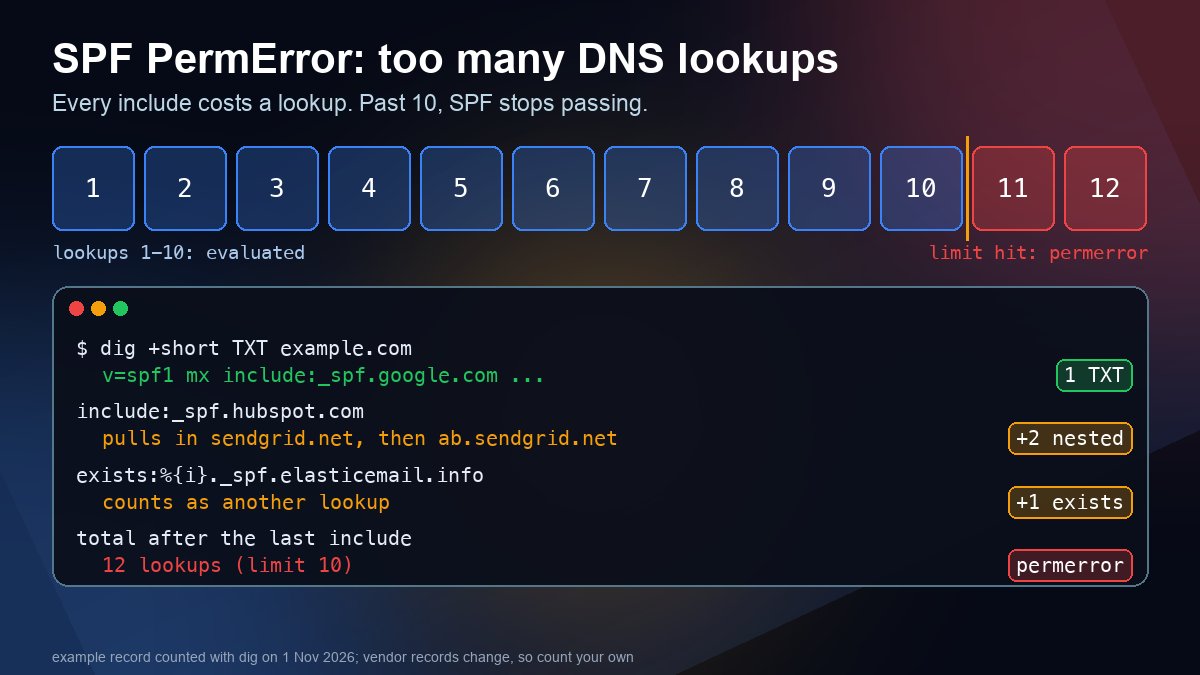
Short answer: an SPF record may trigger at most 10 DNS lookups while a receiving server evaluates it. Every include, a, mx, ptr, exists and redirect counts, and so does everything inside the records those includes point to. Go past 10 and the receiver returns permerror, which means your SPF check does not pass at all. The fix is to count your lookups, delete senders you no longer use, and move the rest to subdomains or a smaller record.
That limit comes from RFC 7208, section 4.6.4. It exists to stop a single email from causing an unreasonable number of DNS queries at the receiving end. Mail that fails SPF this way is not always rejected, but it loses a signal that spam filters and DMARC rely on, and with a strict DMARC policy it can be quarantined or bounced.
What counts toward the 10 lookups
| Term in your SPF record | Costs a lookup? | Note |
|---|---|---|
include:vendor.example | Yes, plus whatever is inside it | The usual cause of the problem |
a or a:host | Yes | One lookup for the name |
mx | Yes | One for the MX query. Each MX host may also be resolved, but no more than 10 address lookups per mx term |
exists:, redirect= | Yes | Often used by large mail vendors |
ptr | Yes | RFC 7208 says it SHOULD NOT be published. Remove it |
ip4:, ip6:, all | No | Listing IP ranges directly is free |
The counting is recursive. If your record has include:a.example and that record has two more includes, you have spent three lookups, not one. RFC 7208 also says an include that points at a name with no SPF record at all returns permerror, so a typo in a vendor name breaks the whole record, not just that vendor.
How to tell that this is your problem
- Read the message headers. In Gmail, open the message, choose Show original and read the SPF result at the top and in the
Authentication-Resultsheader.spf=permerroris this problem.spf=softfailorspf=failmeans your record was evaluated fine but the sending server is not in it, which is a different fix. - Print the record. Run
dig +short TXT example.com, or use the DNS lookup tool and pick TXT. You should see exactly one value that starts withv=spf1. - Count. Walk the record from left to right and run
dig +short TXTon every include target, then on the includes inside those results, adding one for each counting term in the table above.
It also explains why the failure can look random. A receiver evaluates left to right and stops at the first term that matches the sending IP. Mail from a server that matches an early term passes, while mail from a sender listed near the end has to walk past the limit first and fails. Two vendors in one record can behave differently for that reason alone.
A real count, measured today
To show how quickly it adds up, I built a record that a growing company could plausibly end up with: its own MX hosts, Google Workspace, Microsoft 365, Brevo, HubSpot, Mailchimp, Mandrill, Elastic Email and Zendesk. I then counted it recursively with dig @1.1.1.1 on 1 November 2026.
v=spf1 mx
  include:_spf.google.com            -> 2
  include:spf.protection.outlook.com -> 3
  include:spf.brevo.com              -> 4
  include:_spf.hubspot.com           -> 5
    include:sendgrid.net             -> 6   (inside HubSpot)
      include:ab.sendgrid.net        -> 7   (inside that)
  include:servers.mcsv.net           -> 8
  include:spf.mandrillapp.com        -> 9
  include:_spf.elasticemail.com      -> 10
    exists:%{i}._spf.elasticemail.info -> 11  (inside Elastic Email)
  include:mail.zendesk.com           -> 12
  ~all
TOTAL: 12 lookups (limit 10) = permerror
Two things stand out. First, nine visible includes are not the real count: HubSpot pulls in SendGrid, which pulls in another SendGrid record, and Elastic Email uses an exists term. Second, vendors change these records. Google's _spf.google.com answered with a single flat list of IP ranges on that date, so it cost one lookup, but older guides that count more for Google were written for an earlier layout. Never copy a lookup count from a blog post, including this one. Count your own record on the day you change it.
Five ways to get back under 10
1. Delete senders you no longer use
Old newsletter tools, a retired help desk and a trial that never ended are the most common fat. Before you delete an include, confirm that nothing still sends through it: check DMARC aggregate reports if you collect them, or search the last few months of sent mail for that vendor's name in the headers. Remove one vendor at a time.
2. Give each vendor its own subdomain
Instead of putting everything on example.com, send marketing mail from news.example.com and support mail from help.example.com. Each subdomain publishes its own SPF record with its own budget of 10 lookups. Under DMARC's default relaxed alignment, a subdomain in the From address still aligns with your main domain, so you do not lose DMARC alignment. This is the cleanest fix because it does not depend on anyone's IP ranges staying put.
3. Let the vendor handle SPF on its own bounce domain
Many mail services let you set a custom return-path (also called MAIL FROM) that points at them, so SPF is evaluated on a name they control and your main record does not need their include at all. Check the vendor's own setup guide for the exact CNAME records. If the vendor keeps its own bounce domain, SPF can still pass for them, but it will not align with your From domain, so DMARC then depends on their DKIM signature.
4. Replace includes with IP ranges (flattening), but only where the IPs are stable
Writing ip4: and ip6: terms costs no lookups. It is safe for your own mail servers, whose addresses you control. It is risky for a large vendor, because they add and retire sending IPs and your copy goes stale without any error. If you flatten a third party, automate the refresh and keep monitoring, or do not do it.
5. Lean on DKIM instead
DMARC passes when either SPF or DKIM passes with an aligned domain. If a vendor signs mail with a DKIM key on your domain, SPF is a second line of defence for that sender, not the only one. Make sure the DKIM record is published and passing first, which our guide to finding your DKIM selector and verifying the key walks through, then decide whether that vendor still earns a spot in SPF.
Other things that produce the same error
- Two SPF records. A domain must not publish more than one
v=spf1TXT record. If the lookup shows two, a receiver returnspermerroreven though each record is valid. Merge them into one. Our SPF for Google Workspace post shows how to merge an include into an existing record without creating a second one. - A misspelled include. An include that points to a name without an SPF record is itself a
permerror, per the table in RFC 7208. - Too many void lookups. The RFC recommends that implementations allow at most two lookups that return nothing. Stale
a,mxorexiststerms whose names no longer return any answer can trigger it even when the total is under 10. - A record that is too long. A single DNS string holds at most 255 characters, so a long record must be split into several quoted strings inside one TXT record, and receivers join them with no spaces. Most DNS dashboards do this for you. RFC 7208 also suggests keeping the whole answer under about 450 octets so it fits in a single UDP reply.
After you edit the record
- Publish the new value by editing the existing TXT record, not by adding a second one.
- Re-run
dig +short TXT example.comagainst your authoritative nameserver and count again. If you are unsure which servers those are, use the nameserver lookup first. - Send a test message from every service that sends as your domain and read the
Authentication-Resultsheader on each. You wantspf=passor an aligneddkim=pass, neverpermerror. - Wait out the old TTL before judging the result, since receivers may still hold the previous record. Our DNS propagation guide explains why.
If you are still deciding on a policy, the full SPF, DKIM and DMARC setup guide covers how the three records fit together.
Sources
- RFC 7208, section 4.6.4: DNS lookup limits
- RFC 7208, section 5.2: the include mechanism
- RFC 7208, sections 3.3 and 3.4: multiple strings and record size
- RFC 7208, section 5.5: the ptr mechanism (do not use)
- Google Workspace Admin Help: Define your SPF record
- Microsoft Learn: Set up SPF to help prevent spoofing
Frequently asked questions
What is the SPF 10 lookup limit?
RFC 7208 allows a receiving server to perform at most 10 DNS-querying terms while evaluating an SPF record. The terms that count are include, a, mx, ptr, exists and redirect, including any that sit inside the records you include. Past 10, the result is permerror.
Does ip4 or ip6 count toward the SPF lookup limit?
No. The ip4, ip6 and all mechanisms do not trigger DNS queries, so listing IP ranges directly costs nothing. The catch is that vendor IP ranges change, so copied ranges can go stale without any warning.
Will emails be rejected when SPF returns permerror?
Not automatically. SPF simply does not pass. What happens next depends on the receiver and on your DMARC policy: if DKIM also fails to align and your policy is quarantine or reject, the message can be filtered or bounced.
Can I have two SPF records on one domain?
No. A domain must publish exactly one v=spf1 TXT record. Two records make receivers return permerror even when each is valid on its own, so merge them into a single record.